
Monitor UI
Embedded surveillance monitor system for 7" / 10" tap-only screens — building a complete UI specification from zero under firmware and hardware constraints.
Designed without iOS / Android conventions.
Project details
Monitor UI is an embedded surveillance interface designed for 7" / 10" wireless security monitors supporting Single / Dual / Quad multi-view display. Unlike iOS / Android products, this platform has no native design system — every component, state, and interaction rule had to be defined from scratch and delivered as a Firmware-implementable specification.
Role
Lead UI/UX Designer
Status
Live
Year
2025 — 2026
Context
Monitor UI is not a mobile interface — it runs on embedded hardware with single-tap input, limited firmware processing, and small 7" / 10" screens. Complex gestures like swipe, pinch, or multi-touch are not viable.
The product supports Single / Dual / Quad multi-view display for long-duration passive monitoring scenarios. The core design challenge was balancing information density and operational simplicity, while defining a power-saving interaction model suitable for always-on placement.
Because the platform has no native iOS / Android design system to inherit, the UX work began with building the Information Architecture, component rules, and state specifications from zero — serving as the common ground for PM / FW / QA alignment.

Constraints & Decisions
Four hardware and system constraints shaped every design decision: tap-only interaction, 7" / 10" screen real estate, limited firmware computing resources, and state ambiguity across multi-view layouts.
Key decisions mapped to these constraints:
Tap-only interaction — Large tap targets across all flows / no reliance on swipe or pinch / clear visual feedback for every state.
Small screen real estate — Single primary task per page / progressive disclosure in Power Saving and Playback / OSD anchored to edges to preserve main video visibility.
Firmware resource limits — Playback split into Date Filter + Event Type + File List rather than real-time re-querying / avoids loading large datasets in a single pass.
State boundary clarity — Power Saving and Wake on Detection separated into independent settings / OFF state automatically disables Wake on Detection to eliminate the logical conflict of "will not sleep but can be woken up" / AI Detection Area defined across 10 complete states from Default through Edit / Save / Cancel.
Trade-off:
An earlier concept proposed gesture-based region drawing for the Detection Area, but firmware processing limits and tap-only hardware required a grid-based selection model instead. The result is less fluid visually, but produces predictable, testable, and FW-implementable behavior across all 10 defined states.

Outcome
Monitor UI delivered a complete Firmware-implementable UI specification covering four critical flows: AI Detection, Power Saving, Playback, and Live View OSD.
Deliverables included:
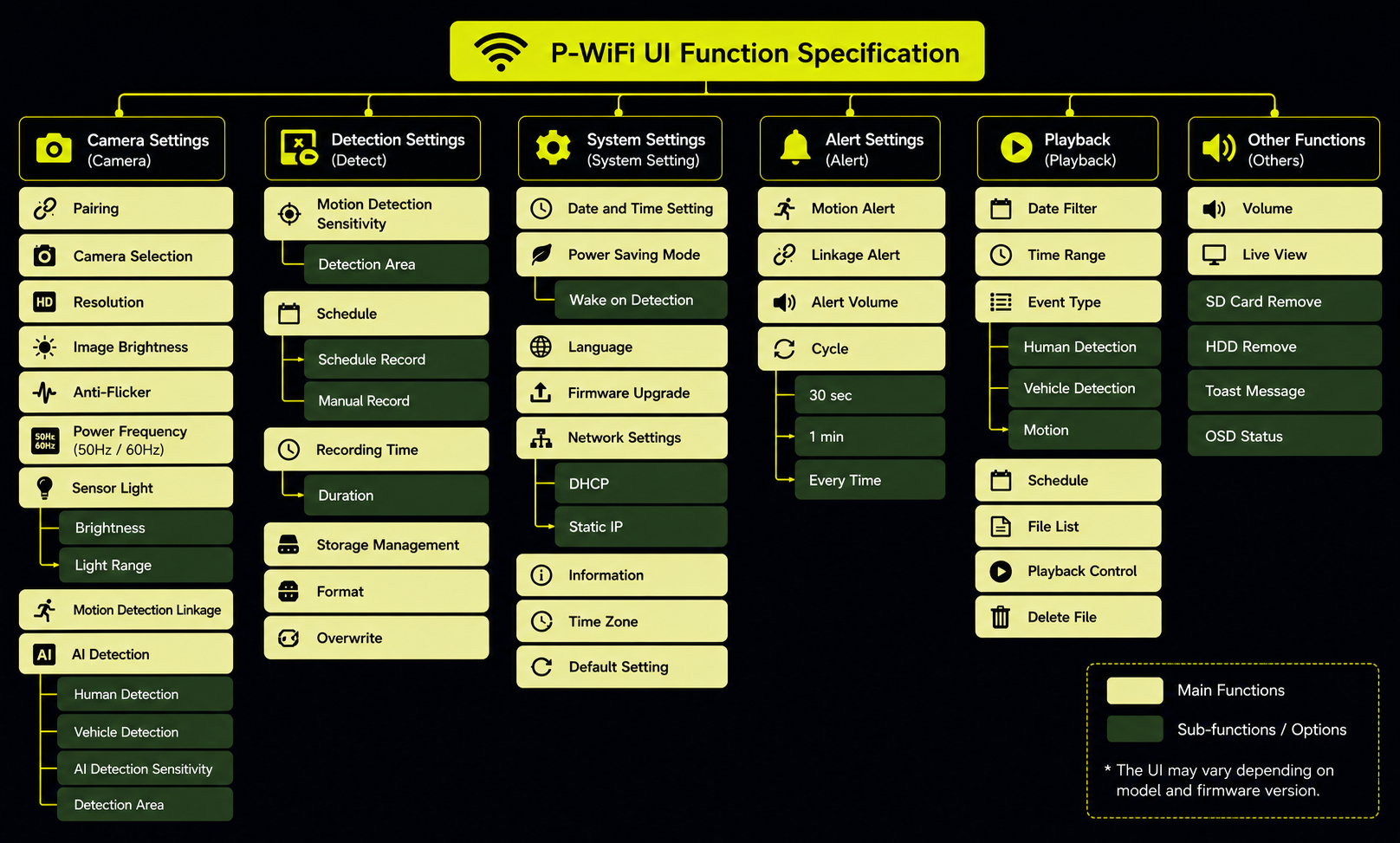
Information Architecture covering 6 functional groups and 40+ sub-functions / Component, Token, and Pattern definitions for an embedded platform without a native design system / Full state specifications including Default, Active, Edit, Save, Cancel, and Error / Edge-case logic for OFF-boundary conditions and conflict resolution / Firmware UI Spec documents shared across PM / FW / QA teams.
The specification reduced repeated clarification cycles during implementation and established a long-term maintainable design baseline for future embedded products on the same platform.

What's next?
Full case study materials including the complete IA map, state diagrams, component specifications, and Firmware UI Spec documents are available upon request.
For collaboration or interview opportunities, feel free to contact me via email or LinkedIn. contact@yasminalin.com.tw